How to Fix & Optimize Ergonomic Mechanical Keyboard (2026 Practical Guide)

Troubleshooting and Optimizing Your Ergonomic Mechanical Keyboard (2026) Quick Summary Ergonomic mechanical keyboards are designed to enhance typing comfort and efficiency. However, issues may arise that affect performance or usability. This guide provides a step-by-step troubleshooting process and optimization tips to ensure your keyboard functions at its best. Step-by-Step Actionable Walkthrough Step 1: Check Physical Connections Inspect the Cable: Ensure that the USB cable is undamaged. Look for frays or kinks. Reconnect the Keyboard: Unplug the keyboard and plug it back into a different USB port to rule out port issues. Test on Another Device: Connect the keyboard to another computer to determine if the issue persists. Step 2: Update Drivers Access Device Manager: Right-click on the Start menu and select “Device Manager.” Locate Keyboards: Expand the “Keyboards” section. Update Driver: Right-click on your ergonomic mechanical keyboard and select “Update driver.” Choose “Search automatically for updated driver software.” Restart the Computer: After updating, restart your system to apply changes. Step 3: Check for Software Conflicts Close Background Applications: Close any unnecessary applications that may interfere with keyboard functionality. Disable Key Remapping Software: If you use software to remap keys, disable it temporarily to check for conflicts. Test in Safe Mode: Boot your computer in Safe Mode to see if the keyboard works correctly without third-party software. Step 4: Clean the Keyboard Unplug the Keyboard: Ensure the keyboard is disconnected from power. Remove Keycaps: Use a keycap puller to gently remove keycaps for deeper cleaning. Clean with Compressed Air: Blow out dust and debris from the switches and beneath the keycaps. Wipe Down Surfaces: Use a microfiber cloth slightly dampened with isopropyl alcohol to clean the keyboard surface. Step 5: Test Key Functionality Use Keyboard Testing Software: Download a keyboard testing tool (e.g., Aqua Key Test) to check if all keys register correctly. Identify Non-Responsive Keys: If certain keys do not respond, note their positions for further inspection. Step 6: Adjust Keyboard Settings Access Keyboard Settings: Go to Control Panel > Hardware and Sound > Devices and Printers > Right-click on your keyboard > Keyboard settings. Adjust Repeat Delay and Rate: Modify these settings to enhance typing responsiveness. Enable/Disable Filter Keys: Ensure that Filter Keys is disabled, as it can affect key responsiveness. Alternative Tips Firmware Update: Check the manufacturer’s website for any firmware updates specific to your keyboard model. Switch Replacement: If certain keys are consistently problematic, consider replacing the mechanical switches if your keyboard supports hot-swappable switches. Keyboard Layout: Experiment with different layouts (e.g., QWERTY, Dvorak) to find one that enhances your typing experience. Ergonomic Accessories: Use a wrist rest or an adjustable keyboard tray to further optimize your typing posture and comfort. By following these steps, you can troubleshoot and optimize your ergonomic mechanical keyboard for improved performance and comfort in 2026. ...

2026년 11월 14일

Top 5 Best Ergonomic Mechanical Keyboard for Desk Setup (2026 Buyer's Guide)

2026 Buying Guide: Best Gaming Keyboards When looking for the perfect mechanical gaming keyboard, buyers are often concerned about compatibility, responsiveness, and ergonomic design. In 2026, there are numerous options available, each offering unique features. This guide breaks down five top models to help you make an informed decision based on build quality, connection types, battery life, and ergonomics. 1. Silakka54 Wired Split Mechanical Keyboard Build Quality: Sturdy plastic frame with a split ergonomic design for reduced wrist strain. Connection: Wired; includes customizable modes through QMK/VIAL software. Switches: Hot-swappable switches for easy customization. Ergonomics: Split design allows for better wrist positioning, enhancing comfort during long gaming sessions. Pros High customizability with hot-swappable switches. Ergonomic split design. Full support for QMK/VIAL, offering extensive programming options. Cons Wired connection may limit portability. Smaller key layout might not suit everyone. 2. Aula F75 Mechanical Keyboard Build Quality: Solid construction with a compact 75% layout. Connection: Tri-mode: Bluetooth, 2.4GHz wireless, and USB-C for versatile connectivity. Battery Life: Long-lasting battery life (>10 hours with RGB on). Switches: Hot-swappable mechanical switches; RGB lighting adds aesthetic value. Pros Wireless convenience with multiple connection methods. Compact size saves desk space while offering functionality. High-quality RGB lighting options for customization. Cons Battery life may decrease significantly with extensive RGB use. Moderate key travel may not suit all gamers. 3. IROK ND63 Max ND63 Ultra Build Quality: Durable with a compact 60% layout ideal for FPS gamers. Connection: Wired with an impressive response time of 0.125ms. Switches: Features RT0.001mm sensors for high sensitivity. Ergonomics: Compact design facilitates a comfortable reach across the keyboard. Pros Fast response and minimal input delay make it suitable for competitive gaming. Compact layout saves space without sacrificing performance. Very sensitive switches improve accuracy during gameplay. Cons Lacks wireless connectivity options. Limited programming capabilities compared to larger keyboards. 4. EPOMAKER X AULA F108 PRO V2 Build Quality: Premium build with a creamy gasket design, ensuring durability and comfort. Connection: Tri-mode connection, including wireless (Bluetooth), enhancing flexibility. Battery Life: Equipped with a 10,000mAh battery for extended usage. Switches: Fully customizable with user-friendly settings. Pros Long battery life enables all-day usage without frequent recharges. Quality build and design focused on user comfort. Tri-mode connectivity accommodates various setups. Cons Higher price point compared to basic models. May be more complex to set up for novice users. 5. update. K1 PRO Visual Mechanical Keyboard Build Quality: Robust construction with an LCD macro display. Connection: Wired connection ensures low latency and reliability. Battery Life: Not applicable for wired performance. Switches: Mechanical switches designed for durability and tactile feedback. Pros LCD display adds functionality for quick access to macros and settings. Ergonomic features designed specifically for gamers. Reliable wired connection provides consistent performance. Cons Lacks wireless options, making portability less convenient. The added features may lead to a steeper learning curve. Conclusion Choosing the right mechanical keyboard comes down to your specific needs: ...

2026년 11월 7일

Top 5 Best Ergonomic Mechanical Keyboard (Highly Recommended)

The Ultimate Buying Guide for Mechanical Keyboards: Discover Top 5 Picks In today’s tech-savvy world, the keyboard is no longer just a basic tool for typing; it’s an essential accessory that can enhance your gaming, work productivity, and overall computing experience. Whether you are a casual user, a professional gamer, or a coding enthusiast, finding the right mechanical keyboard can transform your daily interactions with your devices. To simplify your search, we have curated a list of five impressive mechanical keyboards that cater to various needs and preferences. ...

2026년 10월 31일

Top 5 Best Ergonomic Mechanical Keyboard (Highly Recommended)

The Ultimate Guide to Choosing Your Perfect Keyboard: 5 Standout Options In the world of computing and gaming, the keyboard is often considered the primary interface between you and your system. Whether you’re a gamer, a programmer, or an everyday user, finding the right keyboard is essential for productivity and comfort. With various options available, we’ve curated a selection of five standout keyboards that cater to diverse needs and preferences. Let’s dive into what makes each of these keyboards special! ...

2026년 10월 24일

Top 5 Best Ergonomic Mechanical Keyboard (Highly Recommended)

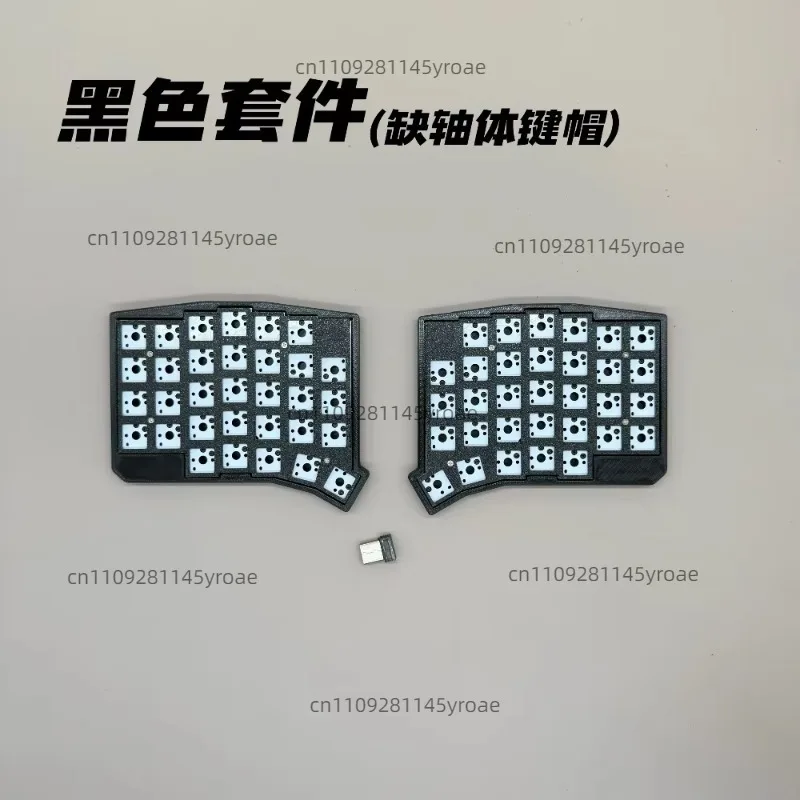
The Ultimate Buying Guide for Mechanical Keyboards in 2023 In today’s tech-savvy world, a high-quality keyboard can significantly enhance your typing experience, whether you’re working, gaming, or simply browsing the web. Mechanical keyboards have gained immense popularity due to their tactile feedback, longevity, and customization options. This guide will take you through five standout mechanical keyboards that cater to various needs and preferences, helping you make an informed decision. 1. 2.4G Wireless Low Profile Split Mechanical Keyboard Kit Ergonomic Design This keyboard kit stands out with its split ergonomic design, allowing your hands to maintain a natural position while you type. This feature can significantly reduce wrist strain during long working hours. ...

2026년 10월 17일

Top 5 Best Ergonomic Mechanical Keyboard (Highly Recommended)

Ultimate Guide to Choosing the Best Gaming Keyboards When it comes to enhancing your gaming experience, the right keyboard can make all the difference. With countless options available, how do you choose the perfect one? In this curated article, we’ll explore five outstanding products, their features, and what makes them stand out. Whether you prioritize customization, ergonomics, or style, there’s something for everyone. Let’s dive in! 1. 2.4G Wireless Low Profile Split Mechanical Keyboard Kit Key Features: ...

2026년 10월 10일
Ergonomic Mechanical Keyboard

Top 5 Best Ergonomic Mechanical Keyboard (Highly Recommended)

The Ultimate Guide to Ergonomic Mechanical Keyboards Finding the perfect ergonomic mechanical keyboard can significantly enhance your typing experience, whether you’re a gamer, a professional typist, or someone who spends long hours at a computer. These keyboards blend comfort with functionality, helping to prevent strain and fatigue while boosting productivity. In this curated selection, we present five exceptional ergonomic mechanical keyboards, each tailored to meet different user needs. 1. Mechanical Keyboard 87 Key Wired Gaming Keyboard This 87-key wired gaming keyboard is designed for those who want a compact yet feature-rich option. With 16 RGB lighting modes, it not only enhances your gaming setup but also provides a customizable experience. ...

2026년 10월 3일

Top 5 Best Ergonomic Mechanical Keyboard (Highly Recommended)

The Ultimate Guide to Ergonomic Mechanical Keyboards: Top 5 Picks for Every User When it comes to typing comfort and gaming performance, an ergonomic mechanical keyboard can make all the difference. These keyboards are designed to reduce strain on your wrists and enhance your overall typing experience. With a plethora of options available, it’s essential to choose one that fits your specific needs, whether you are a gamer, a typist, or someone who spends long hours working at a desk. ...

2026년 9월 26일